
How it actually works
A certified email arrives.
Here is what happens.
A payment notice from the tax office for Rossi Srl, on a Tuesday morning. The same goes for an invoice, a payslip, a contract to be signed.
8:32 · the tax office does this
The certified email arrives where it always does
In the firm’s certified mailbox, the one you already have. Prisma reads it from there and does not touch the mailbox: the message stays where it is, and the only thing that moves is the copy of the attachment that goes into a folder.
A second later · Prisma does this
It works out whose it is and how long you have
It recognises Rossi Srl from the sender, from the VAT number in the text or from how previous ones went; it sees that it is a payment notice and counts the thirty days from the date of service. If the document is a crooked scan and it cannot work it out, it asks you rather than guessing.
When you open it · Prisma does this
It puts it at the top, already sorted
Under the client’s name, with the days left and the attachment ready to file: a consistent name and a suggested folder.
9:10 · you do this
You decide, and one click is enough
You confirm and the document goes into the folder, or you correct the wrong client. It remembers the correction: the next certified email from that sender goes to the right place on its own.
It works this way for everything else: Prisma prepares and proposes, the last word is yours. If it gets something wrong you correct it in one click, and next time it gets there on its own. The only thing that goes out by itself is the reminders and payment chasers to clients: you write the wording once, and you choose which days they go.
Where your things live.
No move required: Prisma sits alongside what you already have.
Your email stays yours
Gmail, Outlook and certified mail keep working exactly as they do today. Prisma is the extra view where the post is already sorted by client: open Outlook and you will find everything in its place.
Documents in the folders you already have
Google Drive, OneDrive or the firm’s server: there you install, on one computer that stays on, a small program that keeps the folders in step. They are the same folders as always, kept tidy. For documents the law requires to be preserved, Prisma also keeps a second sealed copy.
Your accounting software is untouched
Financial statements and tax returns stay where they are, and there is no wire between the two: you import clients once from an export. From then on the client records sit in two places that do not talk to each other, so an address that changes has to be entered in both — or the client updates it from their own link.
Eight jobs you do by hand today.
These, and no others.
Each one is a piece of the day that never makes it onto an invoice. Prisma carries it through to the result and puts it in front of you: the last click is yours.
Post and certified mail in order
You connect Gmail, Outlook and certified mail. Messages also stay in the mailbox you have always used: here you find them already sorted by client. On certified mail from the tax office and the pension authority it reads the date of service and tells you how many days you have to reply.
Documents in your own folders
It reads the attachment and suggests a name and a folder — yours: Google Drive, OneDrive or the firm’s server. For anything the law wants kept for ten years it also makes a second copy, sealed with its date, that can no longer be altered.
Tax deadlines
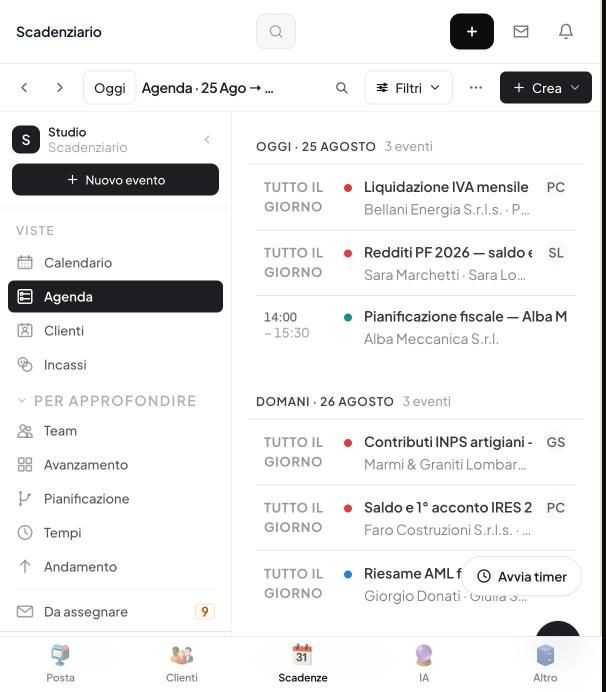
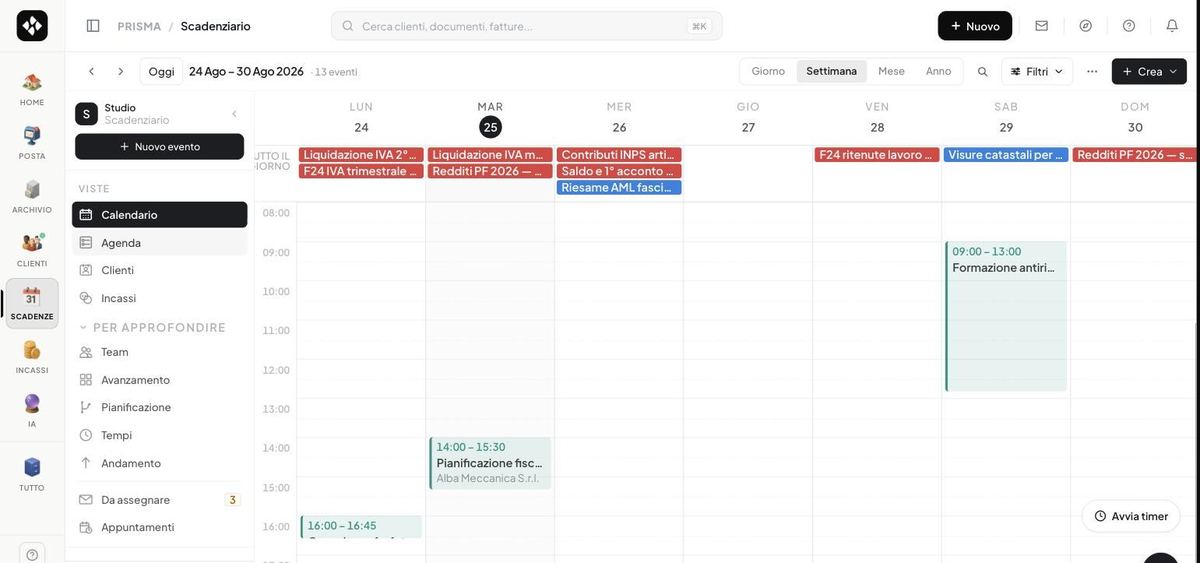
VAT, quarterly VAT returns, tax payment forms, pension contributions, income tax returns: they are generated from the year’s calendar according to each client’s regime, with the person in charge at the firm. Reminders to the client go out on the days you choose.
Signing from the phone
The client opens a link, confirms with a code by text message and signs with a finger: engagement letters, mandates, quotes, approval of tax payment forms. No USB token, no digital ID.
Anti-money laundering
It prepares the file from the client records you already have, checks the identity document, suggests the risk profile and says which documents are missing. The judgement and the signature stay yours.
Clients do their part
You send them a link by email or WhatsApp: they open it on their phone and see only their own things — what to upload, what to sign, what to pay. No app to install, no password to remember.
Fees collected
You send a payment link, the client pays by card or bank transfer and the money lands in the firm’s account. You write the chaser once and it goes out on the days you decided.
Narya, the assistant
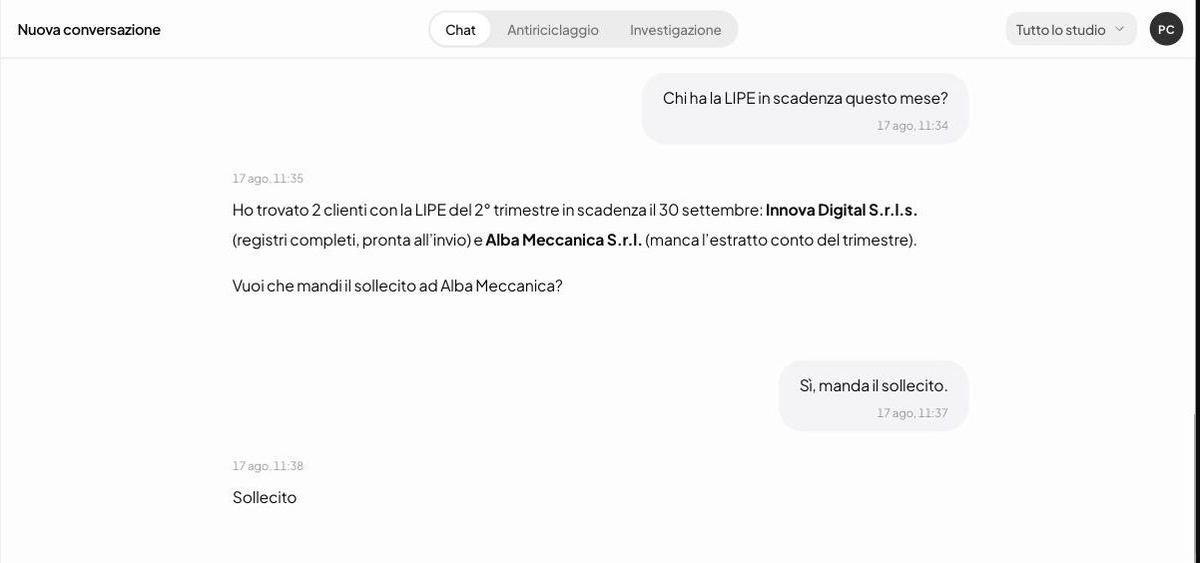
“Which clients have a VAT return due this month?” It searches the documents and deadlines it holds, says where it took the answer from and suggests the next move. Sending it is up to you.
 Enlarge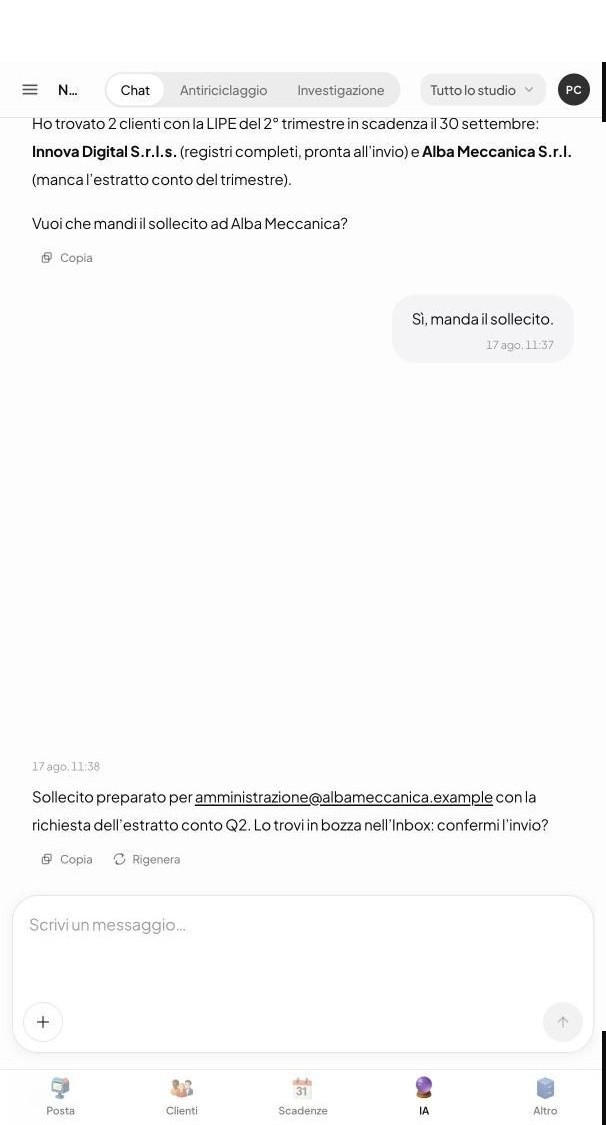
 Enlarge
See Prisma
while doing the dirty work.
Real screens, from a demo firm with fictitious data. Tap them to open them full screen.

The mail
On the left the folders: to answer, high priority, certified mail, and electronic invoices kept apart from ordinary messages. Every row carries the client’s initials and the days remaining.
Enlarge
Good morning
When you open it, at the top you find the day written out in plain language: what is due today, what has arrived, what is waiting for a signature. Below, the numbers to go straight in with one click.
Enlarge
The archive
Every document has a consistent name and sits in the client’s folder, on your Drive or on the firm’s server. Here you search it by client or by type, without opening four folders.
Enlarge
The signatures
You send the engagement letter, the client opens it on their phone and signs. Here you see where each one stands: to send, waiting eight days, signed. The reminder goes out from here.
Enlarge
The collections
The client gets a link: they pay by card or bank transfer and the money goes to the firm’s account. You decide the wording of the chaser once, then it goes out on the days you chose, with nobody having to phone.
EnlargeWant to see it on your own documents? Bring a real one and we will open it together.
Book a demoYour tools stay where they are
Mail, certified email, files, calendars and payments stay where they are. Prisma plugs in there and works next to the tools you have, without asking you to move anything.
Plus the accounting software: clients are imported from TeamSystem, Zucchetti, Profis and the others, only once.




Data and privacy
Where your data lives.
Even when the answer is awkward.
Your privacy adviser will ask three questions. Here are the answers, without hedging.
In your own folders: Drive, OneDrive or the server in your office. If you would rather we kept them, they sit in Google data centres in Italy.
Zurich, not Milan. The European Union recognises Switzerland as a country with the same data protection: under the GDPR it is like keeping data in Europe. The application itself runs in Belgium.
The reading is done by a Google service, and that single step may happen outside Europe. It is written in the contract you sign. Your documents are never used to train any model.
Signatures, certified emails sent, payments and document moves are all recorded with a name and a time: if a client disputes a signature, the log says who pressed and when.
Providers, transfers and safeguards are listed one by one, by name. Something to hand to your privacy adviser.
Read the privacy dossierHow you start
Three steps, and the firm is up and running.
- 1
Connect the mailboxes
Gmail, Outlook and certified mail: you authorise them in a few minutes. Nothing to move, nothing to uninstall — the mailboxes keep working as they do today.
- 2
You import clients once
From an export of your accounting software in Excel or CSV. The two programs stay separate: whatever changes has to be entered in both, or the client updates it from their own link.
- 3
You connect the folders
Google Drive, OneDrive or the firm’s server. The folders you have stay as they are: Prisma looks at how they are organised to work out where new documents go.
Yesterday’s archive is left alone: documents already in your folders stay where they are, and Prisma works on the ones arriving from today. No data conversion, no setup fee, and someone from Optlyx goes through the three steps with you.
Honesty before price
Prisma is not for everyone.
We prefer to tell you first. So you don't waste time — and we don't waste it.
It's for you if
- The day-to-day — certified email, documents, deadlines, signatures — is eating your days.
- You want to keep the accounting software you have and add the intelligence around it.
- You want clients to send documents and pay on their own, with no IT project.
It's not for you if
- You are looking for software that files tax returns and does the bookkeeping: that stays yours, Prisma does not replace it.
- You want AI to decide and sign on its own: here it proposes, the final word stays yours.
- You have no PEC, clients or documents to manage: you would have nothing to do with it.
From €29 per month,
per seat.
You pay per seat, with no annual lock-in: cancel in one click. Setup, training and updates are included in every plan.
Frequently asked
questions.
Does Prisma replace my accounting software?
No, and it does not try. Financial statements, tax returns and bookkeeping stay where they are. Prisma does what your accounting software does not: post and certified mail, document filing, working deadlines, signatures, the area where clients upload and sign, and collections. It does not connect to your accounting software in real time: clients are imported once from an Excel or CSV export, then the records are kept here and an address that changes has to be updated in Prisma too. It sits alongside TeamSystem, Zucchetti, PROFIS, DATEV, Wolters Kluwer, Passcom, Sibill, GB and Buffetti: they do not talk to each other, and they do not get in each other’s way.
How much does it cost, and what changes between plans?
From €29 a month per seat, that is per person at the firm who uses it. Starter at €29 covers post and certified mail, filing, deadlines, signatures and the client area. Professional at €39 adds tax payment forms the client approves from their own link, engagement letters and contracts, and questions to the assistant about your documents. Business at €49 removes the limits on clients, engagement letters and anti-money-laundering files. Enterprise at €59 is for professional partnerships and networks of firms. Annual billing takes 15% off. Five people on the Professional plan come to €195 a month, or €166 with annual billing.
How do you start, and how long does it take?
It starts with a guided demo on a real workflow from your firm. If you decide to go ahead, we set it up together: you connect email and certified mail, import clients from a file and connect the folders. The documents you already have are not redone from scratch: they stay where they are, and Prisma works on the ones arriving from here on. There is no data conversion and no setup fee.
What can I have signed from a phone, and what not?
The client signs with a link and a confirmation code by text message: this is the advanced electronic signature set out in the European eIDAS regulation, and it needs no USB token and no digital ID. It works for documents between the firm and the client: engagement letters, mandates, anti-money-laundering appointments, quotes, approval of tax payment forms. It does not work where the law requires a qualified digital signature — filing financial statements, documents to be sent to the Companies Register or the tax office on the client’s behalf: there your own digital signature is needed, as it is today.
Does AI decide for me? And what if it gets it wrong?
Prisma proposes, you approve: a signature, sending a certified email, a payment and filing a document all go through confirmation by someone at the firm, and nothing irreversible happens on its own. When it is not sure which client is involved, it asks rather than guessing. If it gets something wrong you correct it in one click, and it remembers that correction for that sender and that client. The time you get back is not the checking, which stays: it is the sorting, the renaming, the folders and the chasing.
Does our fee money pass through you?
No, never. The client pays by card or bank transfer from a link and the money reaches the firm’s account through Stripe, the payment network you activate in about ten minutes inside the guided setup. Optlyx never touches the money and keeps nothing from the payment. You issue the invoice as you do today: Prisma links it to the payment.
What does “kept to legal standard” mean?
That a second copy of the document is kept, sealed with a timestamp that fixes its date and a fingerprint proving nobody has touched it since: that is what the Civil Code asks for accounting records, for ten years. We are not the ones stamping the date: it is applied by a qualified time-stamping authority on the AgID register. The two copies live side by side: the file you work on stays in your folder, the sealed copy is held by Prisma and you download it when you need it. For documents the law wants preserved to a qualified standard — financial statements, tax returns, minutes — a route with qualified signatures and timestamps is used: in the demo we tell you who the preservation provider is and what they sign.
If I stop, will I take my data away?
Yes, whenever you want. Clients, documents and the archive export in standard formats (CSV, PDF, original files), including at the end of the relationship. No annual lock-in and no notice to send months in advance: you stop in one click.
Will my less tech-savvy clients manage to use it?
Yes. The portal is built for the phone and has no passwords: the client gets a link, opens it, photographs the document, signs or pays. No app to install, no sign-up. And whatever they don't do, you do for them in seconds.

Bring a real workflow. We will review it together.
In twenty minutes we rebuild a real step from your firm and show you which manual work Prisma can take away. If you go ahead, we set it up together.